Smart EMI Ultra Pro Max
Calculate Loan Installments, Check Affordability & Download PDF Reports Instantly.
| Year | Principal | Interest | Balance |
|---|
Master Your Loan with Smart EMI Ultra Pro Max
Taking a loan is a big financial commitment, whether it is for your dream home, a new car, or personal needs. The biggest challenge isn't getting the loan approved—it is planning the repayment efficiently. The Smart EMI Ultra Pro Max isn't just a calculator; it is a financial planning dashboard designed to give you a crystal-clear picture of your future payments.
Unlike simple calculators that only show you the monthly installment, our tool helps you visualize how interest accumulates over time and how small pre-payments can save you thousands in the long run.
How to Use This Calculator Effectively?
Getting accurate results is easy. Follow these simple steps to generate your financial report:
- Enter Principal Amount: Input the total loan amount you wish to borrow.
- Interest Rate: Enter the annual interest rate offered by your bank. (e.g., 9% or 10.5%).
- Select Tenure: Choose how many years you need to repay the loan. A longer tenure reduces monthly EMI but increases total interest.
- Pro Tip (Advanced Mode): Switch to the 'Advanced Pro' tab if you plan to make extra payments or have a moratorium period. This is crucial for accurate long-term planning.
What is an Amortization Schedule?
Many borrowers are shocked when they see their loan statement after 5 years and realize the principal amount hasn't decreased much. This happens because of Amortization.
An amortization schedule is a table that details every single payment of your loan tenure. It splits your EMI into two parts:
- Interest Component: This is the profit the bank earns. In the initial years, a large chunk of your EMI goes here.
- Principal Component: This is the money that actually reduces your loan balance.
By clicking the "View Amortization Schedule" button above, you can see exactly when your loan balance will start dropping significantly.
Why Your Privacy Matters (100% Client-Side)
In an era of data breaches, financial privacy is non-negotiable. Most online calculators send your income and loan data to backend servers, where it might be stored or sold to third-party advertisers.
Trusted Tools Web guarantees your privacy. We built this tool using Client-Side Technology. This means the calculation code runs entirely on your own browser (phone or computer). Your financial data never leaves your device.
The "Snowball Effect" of Pre-payments

Did you know that paying just one extra EMI per year can reduce your loan tenure by several years? This is called the 'Snowball Effect'. Use the Advanced Pro tab in this tool to add a small amount in the "Pre-payment" field. You will see the Total Interest drop drastically. It’s not magic; it’s pure math working in your favor.
Why the First 5 Years are Critical
If you plan to make a bulk payment, doing it in the first 3-5 years saves the most money. Doing it at the end of the tenure has very little impact because banks collect most of the interest upfront.
The 40% Rule of Thumb (DTI)
Our AI Affordability Advisor uses the global "40% Rule." Financial experts suggest that all your monthly EMIs combined should never exceed 40% of your take-home income. If it crosses 50%, you are in a risky zone.
Floating vs. Fixed Rates
In a market where rates are dropping, a Floating Rate loan is cheaper. If rates are rising, a Fixed Rate gives peace of mind. Use the slider to increase the rate by 1-2% and see if you can still afford the EMI.
Home Loan Tax Hacks
Long-term loans like Home Loans often come with tax benefits. Our tool highlights a "Tax Saving" badge when conditions are met. However, don't take a bigger loan just for tax breaks; the interest paid is usually higher than the tax saved.
Personal Loans & Car Loans
Personal loans have high interest rates. Car loans are for depreciating assets. Try to keep car loan tenures under 3 to 5 years to avoid owing more than the car is worth.
PDF Reports: Your Paper Trail
Downloading the report allows you to print it out and discuss the budget physically with your family. It serves as a concrete financial goal.
Visualizing Debt
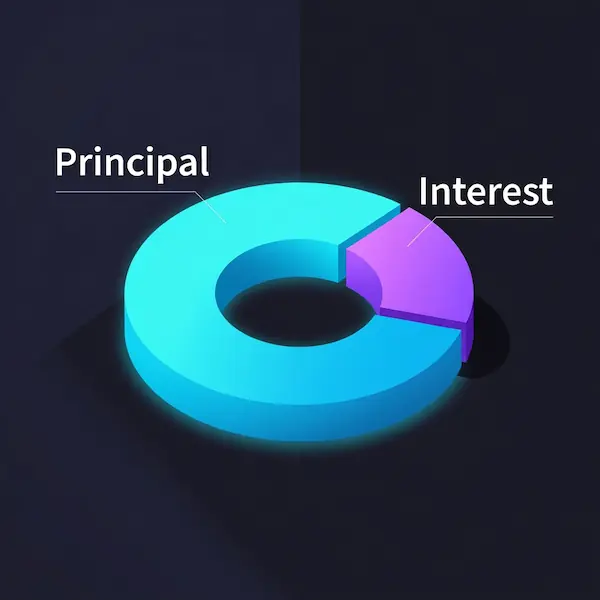
Our interactive Doughnut Chart makes it visually undeniable: seeing a large purple section (Interest) often motivates users to increase their EMI amount slightly to reduce wasted money.
Frequently Asked Questions (FAQ)
1. How can I reduce my total interest payout?
Choose a shorter tenure or make prepayments. Even a small extra payment once a year can drastically reduce your loan duration.
2. Is the computed EMI amount 100% accurate?
It is a close estimate. Actual bank EMIs may differ slightly due to processing fees or insurance charges.
Disclaimer
The results provided by "Smart EMI Ultra Pro Max" are estimates based on standard mathematical formulas. They do not constitute financial advice. Please consult with your bank officer before making major decisions.